
Your Jira board, as a fast native Mac app.
A free, native Kanban desktop app for Jira Cloud.
Same
columns, same swimlanes, just nicer to use.
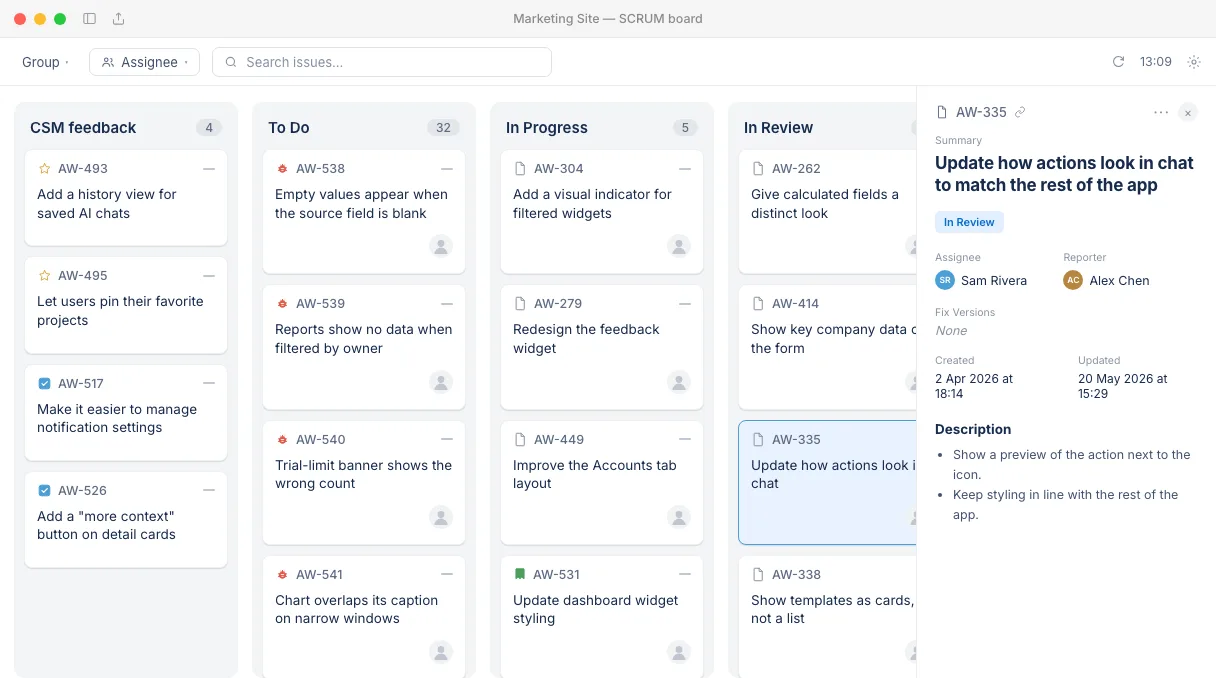
Native, not a browser tab
Your real Jira board, natively.
Columns and swimlanes mirror your Jira board config exactly. Drag a card between columns and the app resolves the right workflow transition for you — no dropdowns, no waiting on a page reload.
Customizable cards
Jira cards that show what you need.
Toggle exactly the fields you want to see — priority, story points, due date, epic, labels, even custom fields from your own Jira instance. Show the density you need and hide the rest.
Full issue editing
Edit Jira issues without leaving the board.
Open any issue in a full panel: inline title editing, assignee and priority pickers, rich-text comments with quote-reply, and attachments via drag-and-drop or paste.
Release tracking
See what's coming.
The sidebar lists the issues in your next Jira release, grouped by your board's columns, with a progress bar and the due date. Switch to any other upcoming release from the menu, and click an issue to open it in the side panel.
Fast & focused
Built for speed, down to the keyboard.
Instant search and assignee filters, auto-refresh, font-size scaling, and keyboard shortcuts for everything you do all day.
- ⌘NNew issue
- ⌘FSearch
- ⌘RRefresh
Everything else you'd expect from a Jira client
Secure sign-in
Atlassian OAuth — no API tokens. Sign-in tokens stay on your Mac, inside the app's sandbox.
Multi-site support
Switch between multiple Atlassian sites and projects from one window.
Rich-text editor
Native editor for descriptions — headings, lists, code, and links.
Attachment previews
Inline image previews; drag, drop, or paste files straight onto an issue.
Done-column cleanup
Auto-archive finished cards so the Done column never gets noisy.
Auto-updates
Sparkle-powered updates arrive quietly in the background.
Frequently asked questions
Is Kanban Desktop free?
Yes. Kanban Desktop is free to download and use.
Does Kanban Desktop work with Jira Server or Data Center?
No. Kanban Desktop works with Jira Cloud only, meaning sites at your-company.atlassian.net. You sign in with your Atlassian account.
Which boards can I open?
Any Kanban or Scrum board you can open in Jira Cloud. Columns and swimlanes come from the board's own settings, so the app matches what you see in Jira. You can switch between several Atlassian sites from one window.
Which version of macOS do I need?
macOS 14 Sonoma or later.
Where is my Jira data stored?
The app talks directly to Atlassian. Your issues and sign-in tokens stay on your Mac, inside the app's sandbox, and never pass through our servers.
Does Kanban Desktop collect any data?
It sends anonymous usage events, such as "issue opened", so we can see which features are used. They never include issue content, issue keys or account details. You can turn them off in Settings under Privacy. See the privacy policy for details.
How do updates work?
Kanban Desktop checks for new versions and installs them in the background using Sparkle, the standard update framework for Mac apps.
Is Kanban Desktop made by Atlassian?
No. Kanban Desktop is an independent app. It is not affiliated with, endorsed by, or sponsored by Atlassian.